Home
Q&A
Careful clicking links

Careful clicking links

3
votes

Be careful clicking links on people's answers. I got a nasty virus from one on downloading some pages on simple Spanish phrases.

1955 views
updated Sep 14, 2011
edited by --Mariana--
posted by katydew
What site? What phrases? - EL_MAG0, Sep 13, 2011
It happened this past Sunday. - katydew, Sep 13, 2011
Always good advice. - KevinB, Sep 14, 2011

10 Answers

6
votes

I would like to take the time here to advocate Linux over Windows. Linux is practically virus proof, it is free, it is easy to use, easy to install, faster internet, faster everything, no crashes ever.

Ubuntu Linux

updated Sep 14, 2011
posted by jeezzle
I'm downloading it now, Jeezzle, thanks for the tip! - galsally, Sep 14, 2011
I have Ubuntu on my old laptop. It's all of what you say. It doesn't have the application support of Windows or OSX, but it can do anything the average person wants to do, only better. - KevinB, Sep 14, 2011
I agree. Except for video editing, I've found I can easily find a free open-source version of just about every program I need. Out of the box, Ubuntu can handle most office-type tasks and internet surfing (comes with open office and firefox installed.) - webdunce, Sep 14, 2011
I have to do occasional video-editing, though. So I'm back to windows because Ubuntu couldn't figure out my particular cameras and I couldn't figure out cinerella or whatever the video editing program is. - webdunce, Sep 14, 2011
But, changing OS's is not a trivial thing, either, and can result in data loss. Above-average computer knowledge is necessary. - webdunce, Sep 14, 2011
Funny, I do video editing on my Ubuntu machine because it has a Firewire interface and the new machines don't. - KevinB, Sep 14, 2011
I just want to say that one can render their PC useless, too, if they don't know what they are doing when trying to install Ubuntu over windows. Sometimes windows is permanently lost and sometimes the hard drive must be wiped to recover from bad installs. - webdunce, Sep 14, 2011
3
votes

I've had this Security Tool virus and although it's not easy to remove, it can be done. I've done this in several friends' computers.

Never pay. The virus will just go dormant until you are asked to pay again. It will also steal your personal information.

Yo need to download MalwareBytes. You have to do this from a non infected computer. Then copy the installer to a memory stick.

Boot up the infected computer in Safe Mode. To do this tap F8 after pressing the power button until a menu appears. Choose "Safe mode with network".

Once the computer is up in safe mode, insert the memory stick, install the MalwareBytes and follow the directions. It will ask you to update the virus definitions before scanning.

Wait for the scan and clean process to end.

Virus gone!!!!!

updated Sep 14, 2011
edited by 00e657d4
posted by 00e657d4
gracias guille, muy util - 00494d19, Sep 14, 2011
Great tip, Guillermo. Trend Micros "Hijack This" is another useful tool for some of the more persistent malware out there. - Izanoni1, Sep 14, 2011
2
votes

Can you be more specific as to where, what links, you think the virus came from?

updated Sep 14, 2011
posted by --Mariana--
:) - EL_MAG0, Sep 13, 2011
1
vote

Was it the link in this post ?

updated Sep 14, 2011
posted by SpanishPal
1
vote

Mac OS is pretty virus-proof as well. also with regard to Microsoft, have you noticed how often its "translator" hangs and just gives a spinning icon?

The other two are quite good but that one seems to be a waste of space and is the first in the list of three.

updated Sep 14, 2011
edited by lagartijaverde
posted by lagartijaverde
I rarely get any answer at all from the Microsoft translator. At least the Babel fish one was amusingly bad. - KevinB, Sep 14, 2011
1
vote

Yes, a similar thing happened to me on a SpanishDict.com ad that I accidentally clicked on. It downloaded a fake antivirus program that basically made my computer unuseable unless I paid them $50 for the "Full Version". I had to go to alot of trouble to remove it.

updated Sep 14, 2011
posted by ArizonaGlen
That's it, that's the one. - katydew, Sep 14, 2011
0
votes

One more tip. If you click somewhere and get this pop up window or anyone similar:

.
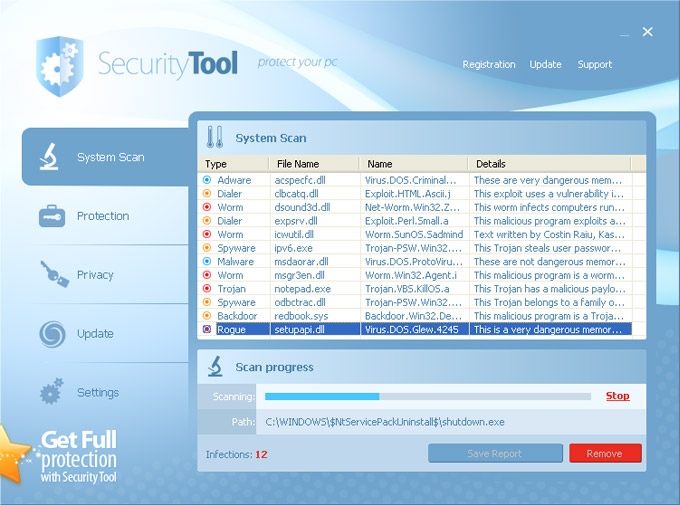
alt text

Don't click anywhere. You have two options:

  1. Hit the power button and shut down the computer. This may cause some information loss.

  2. Open the task manager and kill all instances of the IE, Firefox, Chrome, or whatever browser you are using.

updated Sep 14, 2011
posted by 00e657d4
0
votes

Yes I too had a problem with Ads. One almost crashed my computer a few months ago. From that time I stopped opening any SD ads. I really should have reported it at the time.

updated Sep 14, 2011
posted by croberts
0
votes

I think they're are many people that would like to know which link or advertisement you are talking about. Could you please be more specific?

updated Sep 14, 2011
posted by swampy
0
votes

We are always trying to improve this site, please let us know which answer and which link to be able to remove it. Thanks.


updated Sep 14, 2011
posted by 00494d19















