
Tip: Use Two Monitors And Take Notes When Watching Video Lessons
If you have two monitors, or a few extra dollars to get another monitor it can be very helpful for studying the video lessons.
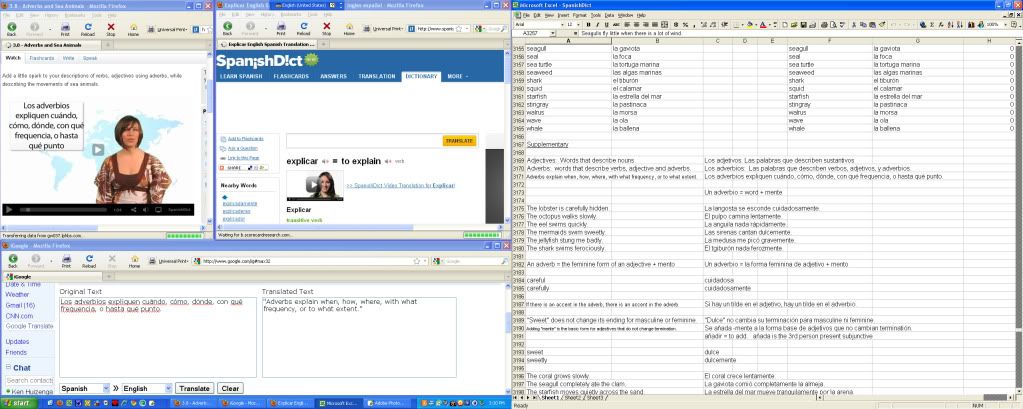
I put the video lesson, a Spanish-English dictionary and a Spanish-English translator on one monitor and I put an Excel (or OpenOfficeCalc) study/review document on the other monitor. I pause the video frequently to take notes. It can really help to learn the material to do this vs. just watching and listening to the lesson in one shot.
After you type the Spanish sentence into your review document you can cut and paste it into the translator. Then you can cut and paste the English translation into your spreadsheet document. I always use Control-C for copy and Control-V for paste to speed up this process. You can also cut and paste both the English and Spanish Vocabulary from the flashcards for the lesson. You need to find the lesson in the flashcards section, however, to do this as the list of words is shown in that version, but not in the flashcards which are directly linked to the lesson.
I also use the Excel document to practice spelling of the vocabulary (there is a separate post on this) and I also use it to review information from prior lessons, to practice writing phrases and sentences, etc. I have it set up so that it gives me "RIGHT" if I type something exactly right and a "WRONG" if I make any mistake.
5 Answers
Now just when I thought i had it made by doing the lessons diligently ,albeit
never actually writing because my one finger fumble is a tad too slow to get
beyond 3 points, and teeth grindingly groping through all the flash cards ,
now you go and mess with my mind . ?Ubuntu" two monitors , copy and paste,
automatically minimises, windows! the only windows I am thinking of using
is the one I shall exit with the screaming ab-dabs.
I am confused , confounded and possibly cantankerous , this strange disjointed
language leaves me muttering obsolete phrases like ,"god help me mom I know
not what I do " then dribbling into my beard and scratching imaginary parts
which are either no longer in existence or have long since past their use by date .
Oh please dear lord if there is any justice left in this sorry world "beam me up now"! 
I thought some members who are using Paralee's excellent videos to learn Spanish or English might benefit from seeing this old post.
By the way, I use OpenOffice spreadsheets to practice writing lessons from several other websites. Spanishblog.com, for example.
I also purchased an electronic version of Advanced Spanish Grammar by McGraw Hill. I was able to cut and paste about 1500 complete Spanish sentences from the answer section of the book, and then I do the lessons and try to come up with the correct answer. When I make a mistake I look at the answer and figure out what I did wrong.
Here's a little sample of what I am studying right now. These are about in the middle of the book and it gets harder from here. The book ends with a thorough review of adverbial clauses.
No soporto que Iván vaya siempre sucio
No me importa que no venga Armando
Me molesta que sean poco puntuales
Me sorprende que suspendan el concierto
Me sorprende que vayan a suspender el concierto
¿Te importa que nos acompañe María?
¿Le molesta que abra la ventana?
Me encanta que me digan cosas bonitas
Me repugna que algunas personas maltraten a los animales
¿Te ofende que te diga la verdad?
Me extraña que las tiendas estén cerradas
Resulta sorprendente que Alberto tenga tanta suerte
Es preocupante que Rosa no consiga encontrar trabajo
What I do just not maximize the window with the video in it and just have the two windows side by side.
I don't think this is possible if you use Microsoft Windows, at least not without getting another program, but it's not possible without 2 monitors either!
On Ubuntu you can do it by right clicking the title bar and selecting "always on top" which will mean it never goes behind any other windows and never automatically minimizes.
http://www.ubuntu.com/
I think it's a cheaper (free) alternative, but probably more complicated if you've never used anything but Windows.
I do the same thing, I always have like 20 windows open, and two different browsers.
thanks

















